
IMD and District Heating
District Heating Meters
- You can now register dual meter readings on a district heating meter.
- The unit for the district heating meter is locked (read-only) and cannot be changed.
District Heating – Tariff
You can now manage energy cost and flow cost separately for the district heating energy type.
When you create or edit a tariff with the energy type "District Heating", a new field, "Cost per m³", is displayed. This makes it possible to enter the information needed to calculate costs. At the same time, the field "Cost per unit" has been changed to "Cost per MWh".
District Heating – Locked Energy Type
The energy type "District Heating" is now a predefined energy type with a locked name, meaning the name cannot be edited by users. This ensures consistent handling of the energy type across the system.
Energy Meters and Meter Data
View Meter Readings Older Than Five Years in the Meter Card
You can now view meter readings older than five years directly in the meter card.
This makes it possible to access historical meter readings for verification, reporting, or long-term analysis directly in the meter card. Previously, this data was only available in the follow-up tab. Only years with existing meter readings are displayed.
Interpolated Consumption
A new setting called "Use interpolated consumption" has been added under System Settings → Tools → Energy → General (see image below).
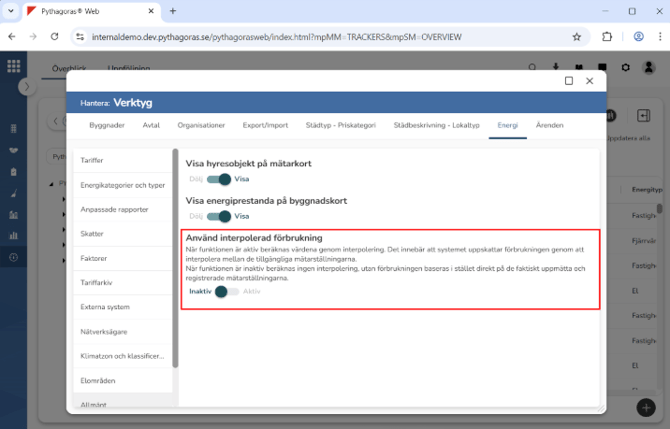
When the setting is enabled, interpolated consumption is used in both graphs and when calculating costs and emissions.
When the setting is disabled (default), measured consumption is used instead in graphs and when calculating costs and emissions.
The only place where interpolated consumption is used regardless of this setting is in the graph on the meter card for mileage meters (MILEAGE), where it is shown in the tooltip.
Energy Costs and Tariffs
Fixed Cost Calculation Changed to "Monthly Fee"
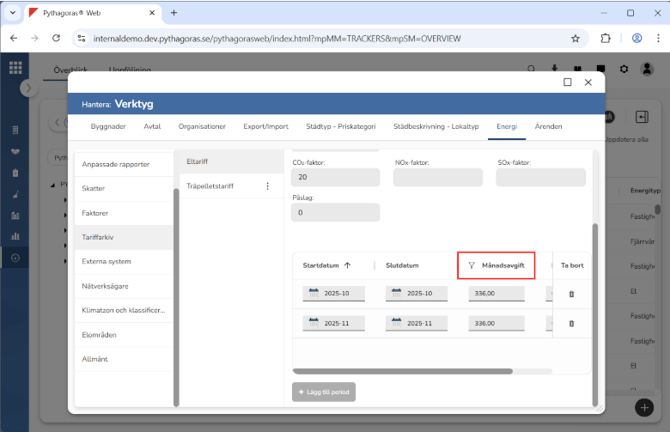
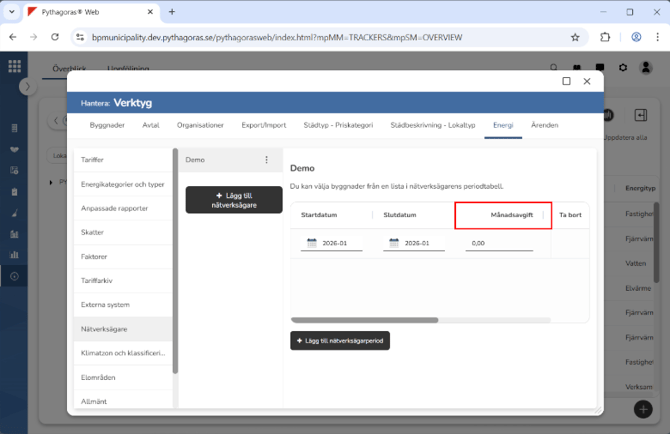
You can now enter a fixed monthly fee instead of a total fixed cost distributed across several months. This makes it clearer how the cost is calculated and simplifies the management of fixed costs.
The field "Fixed cost" has been replaced by "Monthly fee", and the label "Monthly subscription fees" has also been changed to "Monthly fee" under the Network Owner tab (see images below).
Detailed View of Energy Costs
In the contract graph, you can now view an itemised breakdown of energy costs by hovering over the energy section. A tooltip will then appear showing a detailed breakdown of the cost components.
Energy Invoicing
Smarter Handling of Energy Invoicing
It is now possible to control whether energy consumption should be invoiced directly via settings on the contract type. For each contract type, you can easily enable or disable the setting "Invoice energy", giving better control over which contracts should include energy costs. When the setting is enabled, energy consumption is displayed in the invoicing view under the "Invoicing" tab on the contract, and invoices with energy costs can be created. If the setting is disabled, no energy consumption is included in the invoicing.
Correct Accounting Entries When Invoicing Energy Costs
We have updated the invoicing process for energy costs to ensure that correct accounting entries are applied to energy lines during invoicing.
The workflow in the invoicing window is unchanged, so that the user experience remains the same and existing ways of working are not affected.
Energy costs are also invoiced in arrears, which provides better conditions for accurate financial follow-up and management.
Exclusion of Energy and Water Costs During Invoicing
The system now handles exclusion of costs based on settings in the contract.
If "Invoice energy" is set to false, costs for electricity, heating, and cooling are excluded from invoicing. If "Invoice water" is set to false, water costs are excluded from invoicing.
This ensures that invoicing aligns with the settings in each respective contract.
More Flexible Display of Energy Costs in Invoicing
How energy costs are displayed in the invoicing view is controlled by the setting "Summarise energy cost" on the contract. When the setting is disabled, tariff costs from energy meters are grouped and summarised by tariff name. The network owner's transmission fee and energy tax, which are linked to the building the contract object belongs to and thereby indirectly to the contract, are grouped and summarised separately. The network owner's subscription fee is displayed only once per contract.
When the setting "Summarise energy cost" is enabled, the transmission fee and energy tax are summarised together with the tariff costs, providing a more consolidated cost view in the invoicing view. To make it easier to see what each energy item refers to, a tooltip showing the current period is displayed when hovering over the item.
Other Improvements
Detailed Error Message for Network Owners
The error message for overlapping network owners has been improved and is now more informative.
Energy Meters in the Contract Card
The heading "Energy costs" in the Contract/Area and Costs section has been changed to "Energy meters".
View Primary Energy Rating Directly on the Building Card
The building's primary energy rating is now displayed as an icon on the building card, providing a quick and clear overview of energy performance.
Accounting Entries for Network Owners
It is now possible to create accounting entries for the network owner's subscription fee. The transmission fee is handled as a consumption cost in the meter's accounting.